
TL;DR
- Problem: Client onboarding spread across email, Google Docs, Calendly, Trello, and Mailchimp
- System: A connected onboarding workflow that runs itself from signed contract to first deliverable
- Built in: One afternoon
- Replaced: Google Forms, Trello, Calendly, Mailchimp, manual email follow-ups
- Best for: Consultancies, agencies, SaaS companies, and service businesses that onboard 5+ new clients per month
What we mean by "onboarding system" in this guide
Client onboarding is the process that happens between a signed contract and the first real deliverable. It typically involves:
- Collecting client information and preferences
- Setting up internal tracking and project structure
- Sending welcome materials and setting expectations
- Scheduling kickoff calls
- Following up when clients go quiet
In this guide, we describe a connected onboarding system where every step triggers the next automatically. No manual handoffs. No things falling through cracks.
How Meridian Growth Partners built their onboarding system
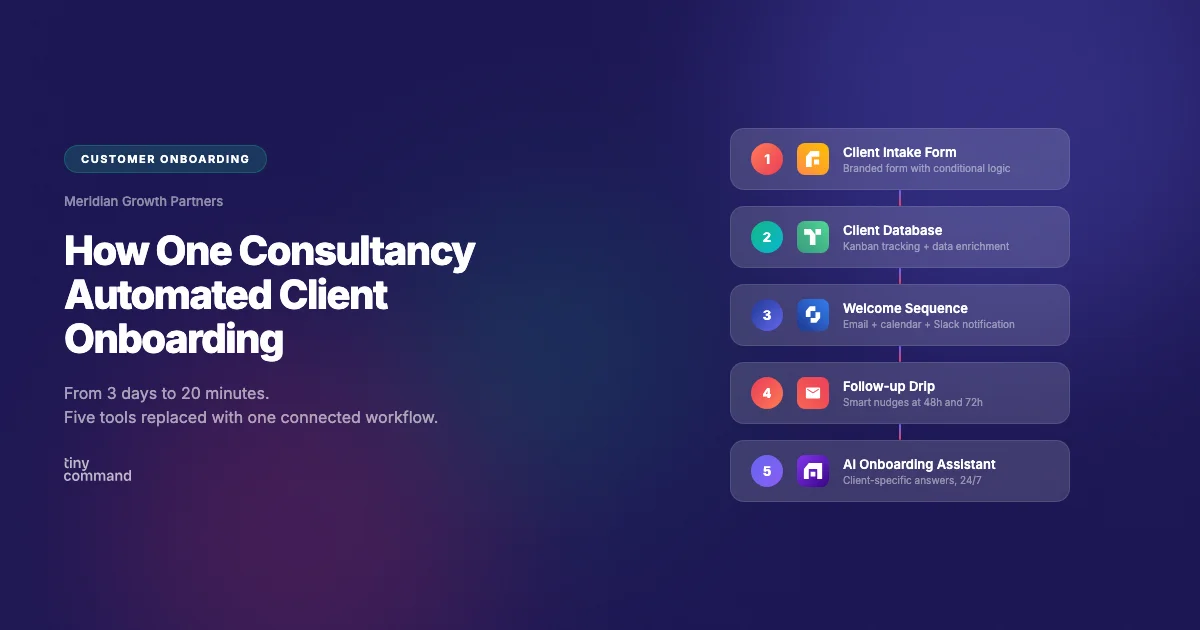
Meridian Growth Partners is a business consultancy that onboards 8 to 12 new clients per month. Before TinyCommand, their onboarding took an average of 3 business days and involved 4 team members manually coordinating across 5 tools.
They built their entire onboarding system in one afternoon using TinyCommand as the execution layer.
- Client intake form
A branded onboarding form captures everything upfront: company details, project goals, team contacts, preferred communication channel, and document uploads.
The form uses conditional logic so B2B clients see different questions than B2C clients.
Phone and email verification happen in real time during the form fill.
- Client database with Kanban tracking
Every form submission creates a record in TinyTables with automatic status tracking.
The operations team sees the pipeline in Kanban view: New, Onboarding, Active, At Risk.
Data enrichment fills in company size, industry, and LinkedIn profiles automatically.
- Automated welcome sequence
The moment a form is submitted, a workflow triggers:
- Sends a branded welcome email with next steps and a resource pack
- Creates a calendar invite for the kickoff call
- Notifies the assigned account manager on Slack
- Adds the client to the active client database
- Smart follow-up drip
If the client has not completed their onboarding checklist within 48 hours, the workflow sends a gentle nudge email.
If still no response after 72 hours, it escalates to the account manager with a Slack alert.
The sequence pauses automatically once the client completes each step.
- AI onboarding assistant
A TinyAgent answers common questions from new clients:
- "When is our kickoff call?"
- "Where do I upload my brand assets?"
- "Who is my account manager?"
The agent pulls answers from the client record in TinyTables, so every response is specific to that client. No generic FAQ pages.
Integration options:
- Slack, Google Chat, Microsoft Teams for internal notifications
- Google Calendar, Calendly for scheduling
- Gmail, Outlook for email delivery
- Any webhook-based tool for custom integrations
The Impact:
- Onboarding time reduced from 3 days to 20 minutes
- Zero manual email follow-ups needed
- Client satisfaction scores increased (fewer things falling through cracks)
- Operations team freed from repetitive coordination work
- One platform replaced five disconnected tools
The entire system was built collaboratively with the operations team in a single afternoon.
This workflow also works for
- SaaS companies onboarding new users or enterprise accounts
- Agencies onboarding new clients with custom project scopes
- Coaches and course creators welcoming new students
- Any service business that needs a repeatable, consistent first impression
This is a system-first approach, not a tool-first one.



